Chrome extension · Gmail + Outlook · 8 languages · open source
See why an email is phishing.
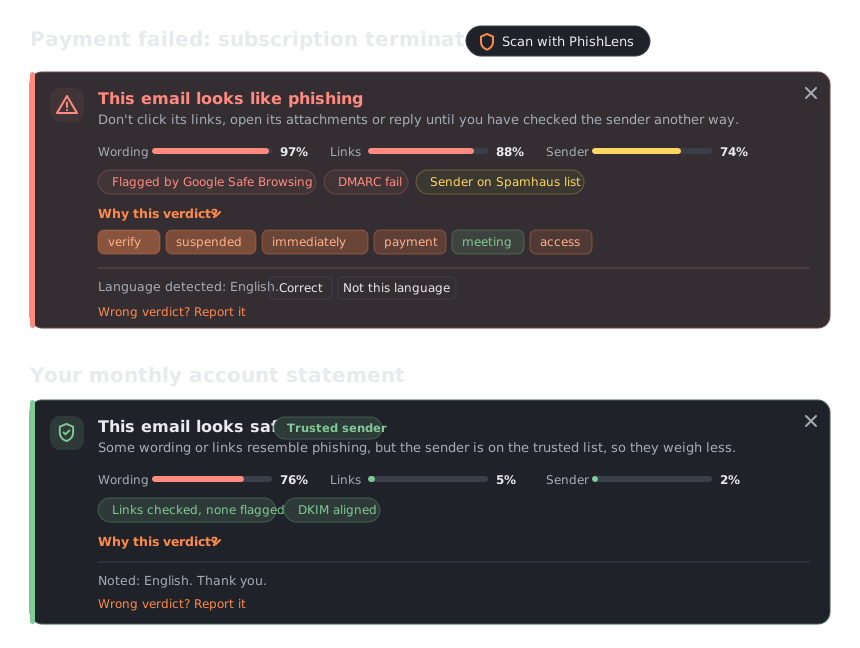
PhishLens adds a verdict above every email in Gmail and Outlook: one score per check, the signals it found, and the words that weighed most. Click Scan, or let it check new mail on its own.
01Results
Measured on real mail no model saw during training (about 330 legitimate emails from one mailbox) and with a load test on PhishLens Cloud: an order of magnitude, not a guarantee. See the known limitations.
PhishLens Cloud, right now
Read from the server when the page loads. Counters reset when the server restarts.
02What it checks
Real bank and university emails use the same words as phishing, so a text model on its own flags them. PhishLens checks the evidence before it decides.
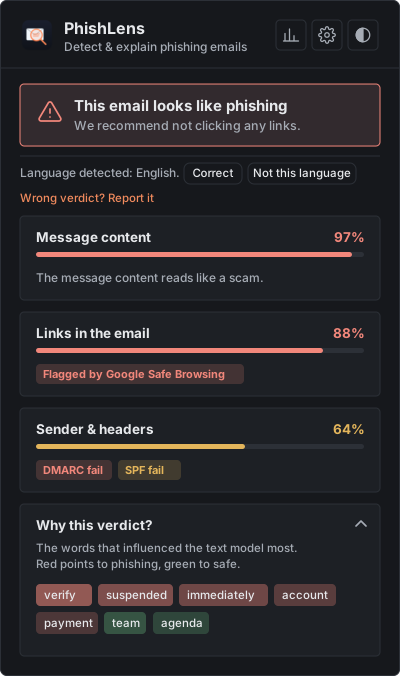
- WordingA multilingual model (mmBERT-small, distilled from a larger phishing detector) scores the text in 22 languages; LIME shows the words that pushed the verdict.
- LinksEvery real link target, including the one behind "Click here", checked against Safe Browsing, PhishTank, URLhaus and Spamhaus.
- SenderSPF, DKIM and DMARC show who really sent it. Forwarded mail does not borrow the forwarder's trust.
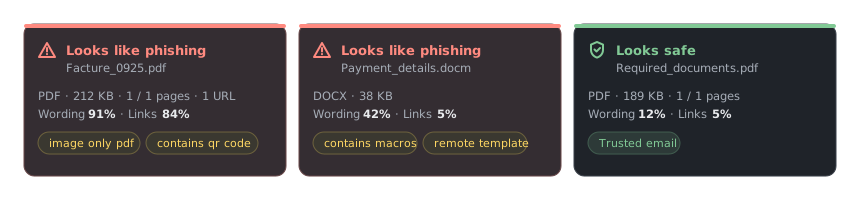
- AttachmentsPDFs (scanned ones through OCR), QR codes, Office macros and remote templates, ZIP, RAR and 7z archives and calendar invites.
- Real inboxesConversations, image-only mail and links to files shared on Drive, OneDrive or Dropbox.
03Features
- Explainable verdictsA score per check, the signals found, and the words that pushed the text model, so you can judge for yourself.
- Gmail and OutlookA Scan button next to the subject in Gmail and Outlook on the web; files and pasted text in the popup.
- Automatic checksOptional: new mail is checked as it arrives, marked Safe or Phishing? in the list, with a notification.
- Private by designNo account. Emails are analysed in memory and not stored; your history stays in your browser. Run your own server and no email leaves your computer.
- Your own accuracyMark each verdict right or wrong and see how PhishLens performs on your real mail, with a CSV export.
- Open and testedLicensed under the GNU AGPL-3.0, with a threat model, CodeQL and more than 300 automated tests run on every change.
04How it works
- ReadThe text, the real link targets, the sender and, in Gmail, the full original headers.
- ScoreA multilingual model for the wording, two Random Forests for the links and the headers.
- VerifyAuthentication results and four threat-intelligence sources, before any verdict.
- ExplainA verdict, a score per check, the signals found and the words behind it, above the email.
05Try it
This box uses the same server as the extension. Nothing is stored, but please use test emails, not private ones.
The verdict, the score of each check and the words behind it appear here.
06Install
PhishLens is not on the Chrome Web Store yet: load it by hand, it takes about two minutes.
1. The extension
- Download
PhishLens-extension-….zipfrom the latest release and unzip it. - Open
chrome://extensionsand turn on Developer mode (top right). - Click Load unpacked and select the unzipped folder.
- Open an email in Gmail or Outlook on the web and click Scan with PhishLens next to the subject.
2. A backend
- PhishLens Cloud (default): nothing to do.
- Your own, private: run it with Docker, then pick Local in the extension settings.
huggingface-cli download AnzouKiona/phishlens-distilbert \ --local-dir backend/model cd backend && docker compose up --build
Python without Docker, configuration and deployment: see the quickstart.